E-QMS
Platform • Documents • Internal audit • Nonconformities • Management review

E-QMS: the platform for your ISO management system

Documents, audits, nonconformities, corrective actions, objectives, risks and management review in one place, for 12 ISO standards, with alerts, checklists and reports generated automatically. The platform is implemented together with QMS Consulting services.

What it solves

A management system that works all the time, not only on audit day

In many organizations the ISO system lives in folders, Excel files and e-mails, and at audit time everyone reconstructs what happened during the year. E-QMS puts the same information into a controlled workflow, with an owner, a due date and a history, so that documents, audits, nonconformities, actions, objectives, risks, training and management review work together every day.

Evidence is recorded as the organization works, and the platform handles whatever can be automated: deadline alerts, the audit checklist, reports and the dashboard.
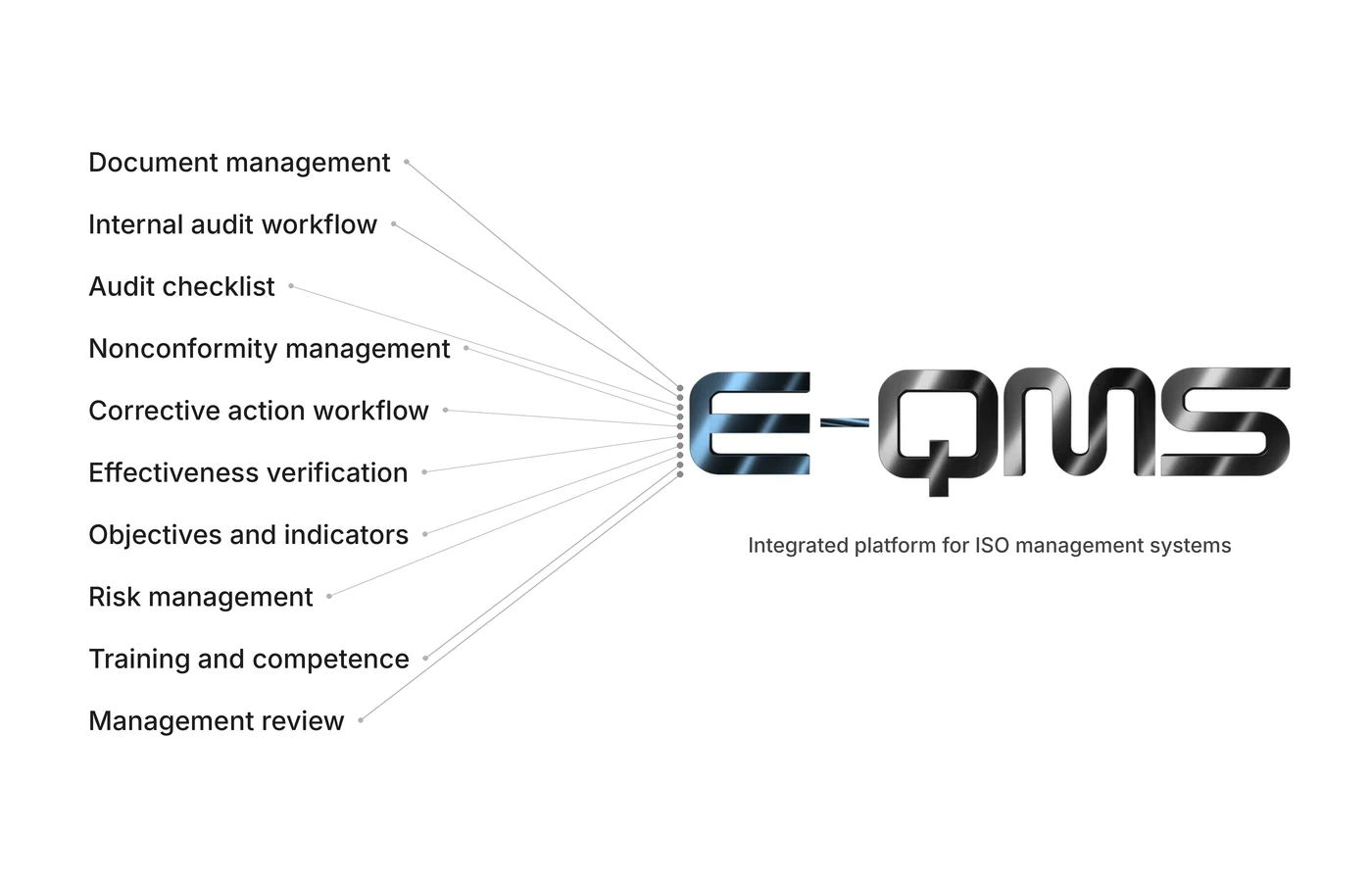
The 10 components of the platform

Documents under control

Every document goes through drafting, review, approval and publication. Only the current version stays in use, and the archive keeps withdrawn versions.

Evidence at hand

Read confirmations, document distribution, audit findings and actions are recorded as work happens, not reconstructed before the audit.

Actions followed up

Nonconformities and corrective actions have an owner, a due date and an effectiveness check. Overdue items appear on the dashboard.

Visible readiness

The dashboard shows audit readiness per standard, objectives, high risks and what is due in the next 30 days.

Automation

Automation: the platform works for you

Repetitive work no longer lands on the system owner. The platform sends, generates and calculates, and people focus on decisions.

E-mail alerts for deadlines

Upcoming or overdue deadlines (actions, CAPA, risks, objectives, training, equipment, document reviews) are flagged by e-mail to each owner through a scheduled task that runs on its own, plus a monthly report.

E-mails to document readers

When a document is approved, readers receive an e-mail with a link to confirm they have taken note of the current version.

Checklist generated from the organization's data

Audit questions start from published documents, nonconformities, objectives, risks, training and equipment. You never start from a blank sheet.

Generated reports

The audit report and the management review report are generated from data already entered, not written from scratch.

Nonconformities opened from the audit itself

A checklist point with a finding opens the nonconformity, with the evidence (notes, photos) attached.

Dashboard calculated automatically

The dashboard recalculates on its own and keeps a daily snapshot, so the evolution of audit readiness is visible.

The 10 components

Everything that happens in the management system, in the same platform

Each component is a workflow with an owner, a due date and evidence. The screenshots come from a demonstration organization with fictitious data.

Document management

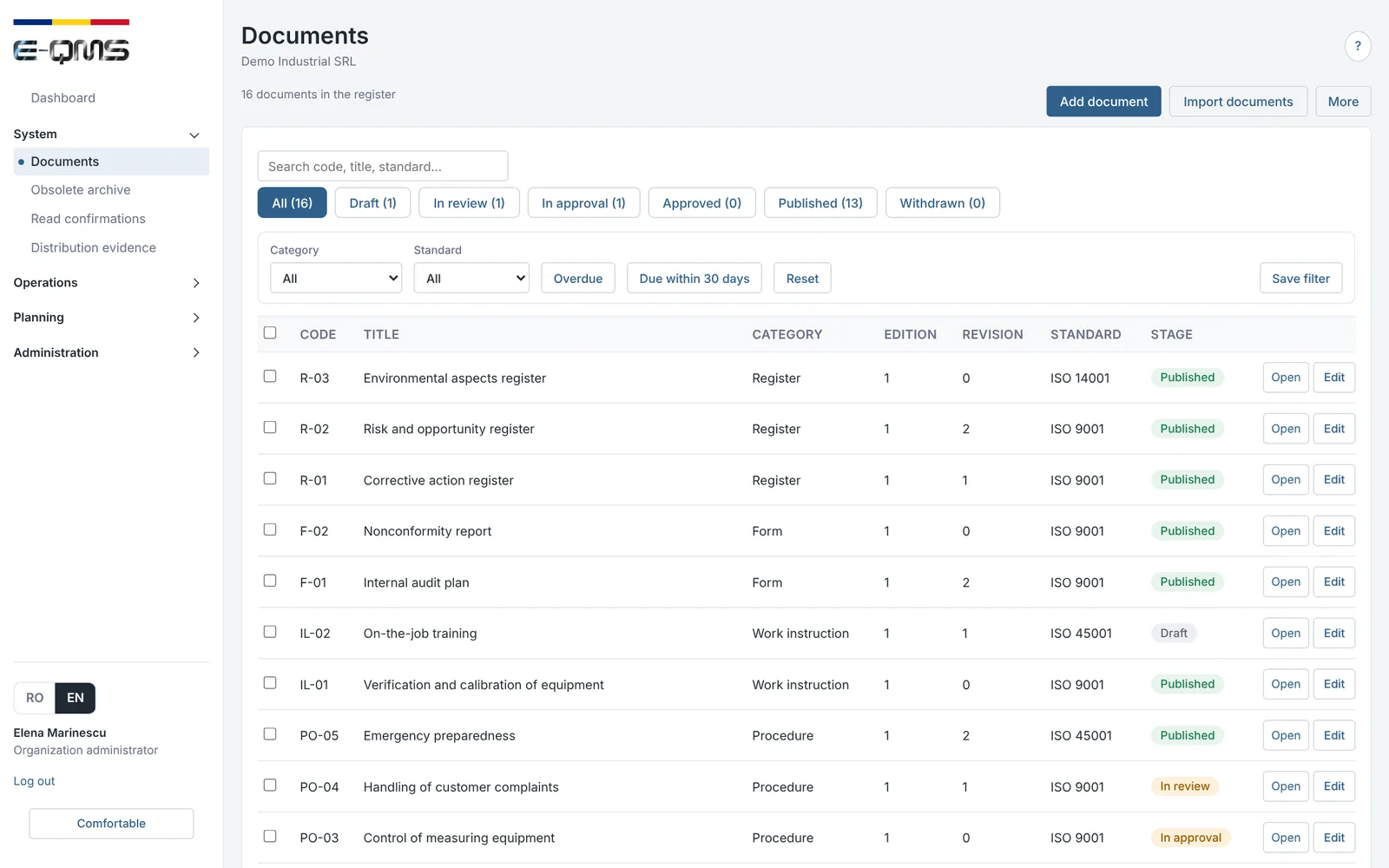
Documents go through drafting, review, approval and publication. Only the current version stays in use, and readers confirm they have taken note of changes.

  • Register with the stage of each document, filters by category, standard and due dates
  • Distribution to the people concerned, with read confirmation recorded
  • Archive of withdrawn versions, so outdated documents do not circulate
E-QMS
Document management – E-QMS
Document register: stage of each document, filters by category and standard.
  1. Draftingthe author writes
  2. Reviewthe reviewer checks
  3. Approvalthe approver decides
  4. Publicationcurrent version
  5. Distributionto the people concerned
  6. Read confirmationrecorded

Internal audit workflow

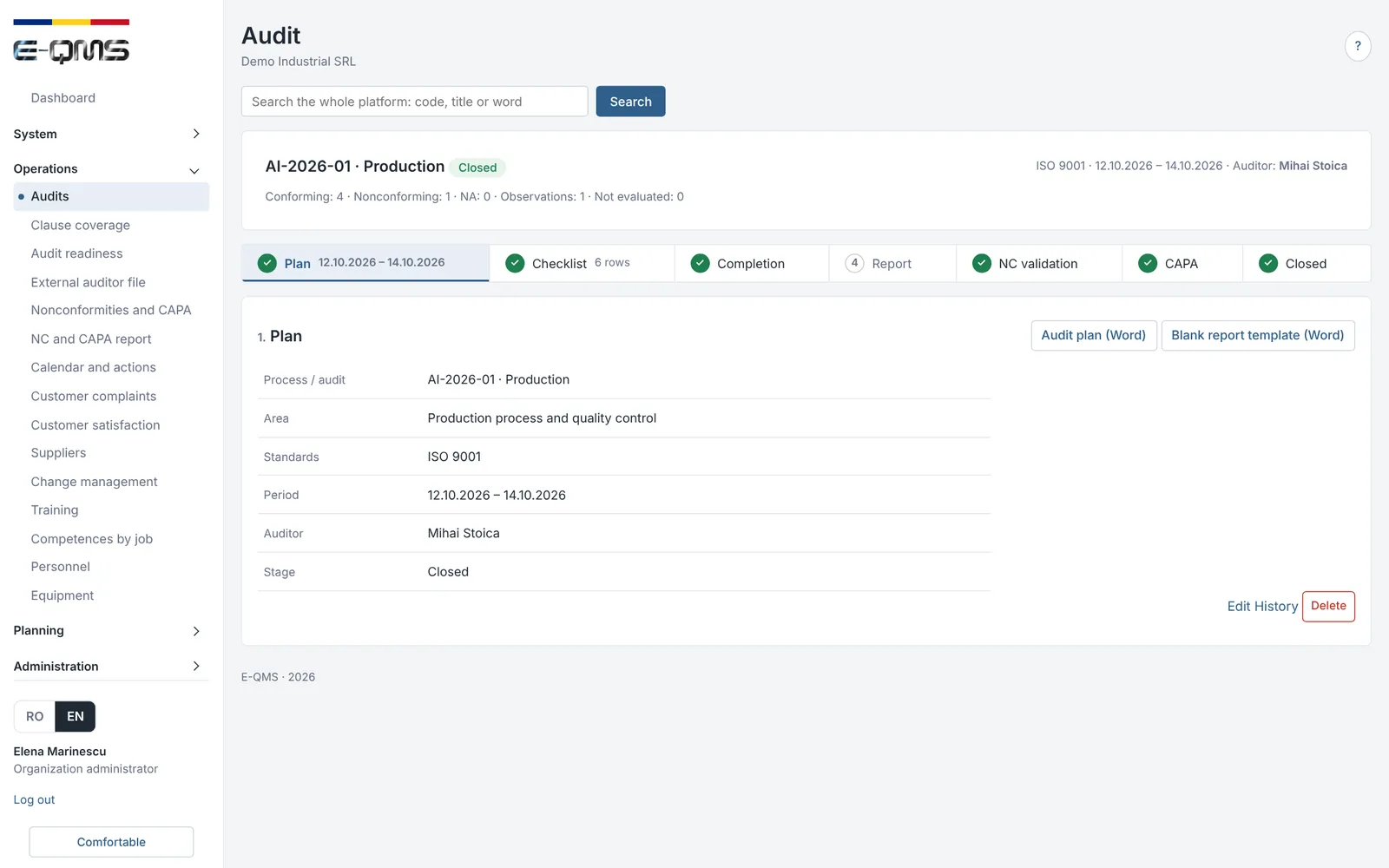
The internal audit goes through clear stages: plan, checklist, completion, report, validation of nonconformities, corrective actions and closure. The auditor and the organization work in the same place.

  • Audit plan with process, standards, period and auditor, also available as a Word file
  • Audit report generated from the completed data, downloadable or sent by e-mail
  • An auditor only has access to the audits assigned to them
E-QMS
Internal audit workflow – E-QMS
Internal audit: the plan and the audit stages, from plan to closure.
  1. Planprogramme and team
  2. Checklistgenerated from the organization's data
  3. Completionon phone, tablet or computer
  4. Reportfindings and conclusions
  5. Nonconformitiesvalidated and recorded
  6. Corrective actionsowner and due date
  7. Effectivenessverified and closed

Audit checklist

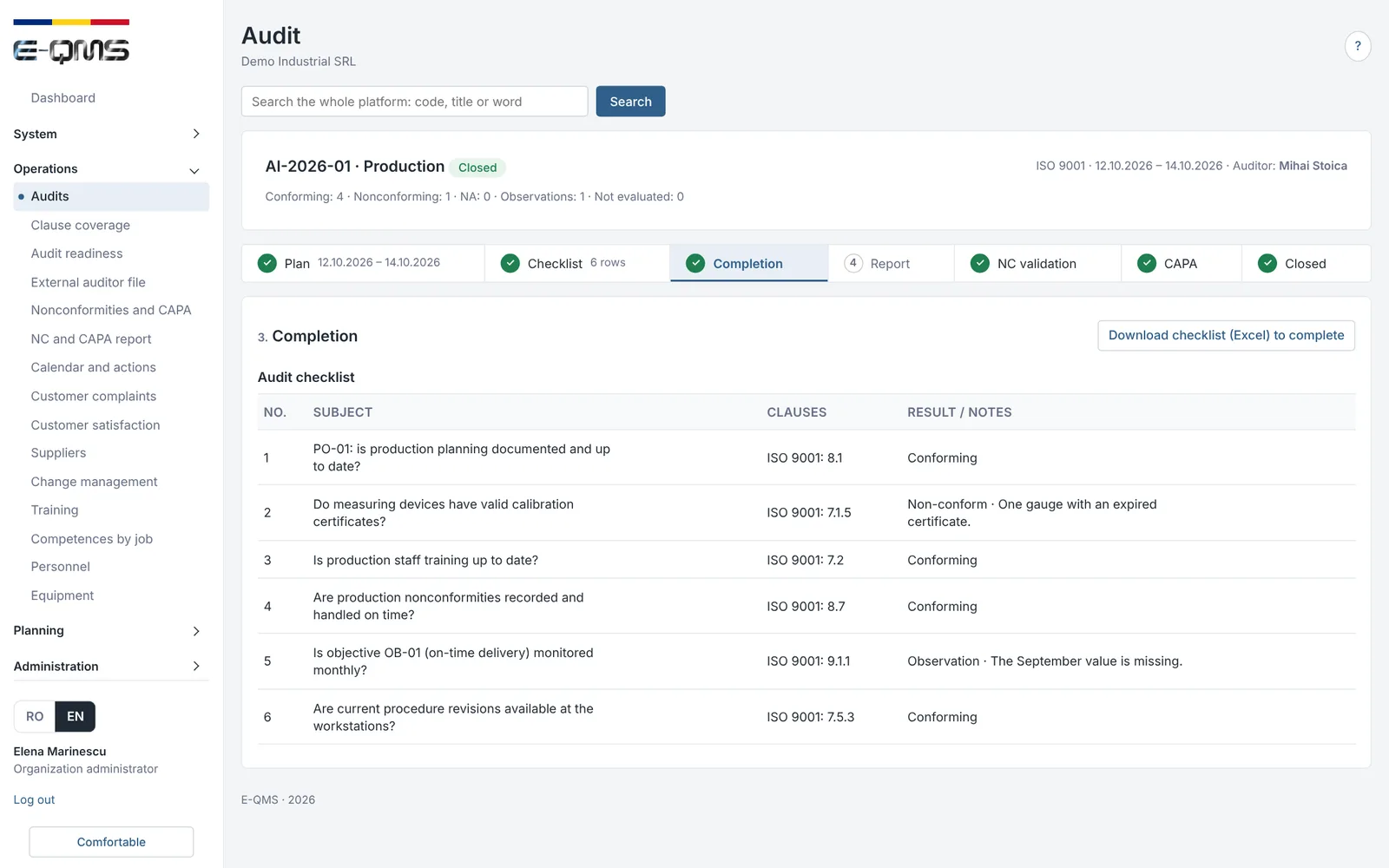
The checklist is generated from the organization's data and completed on a phone, tablet or computer, right where the audit takes place. Questions can be edited before validation.

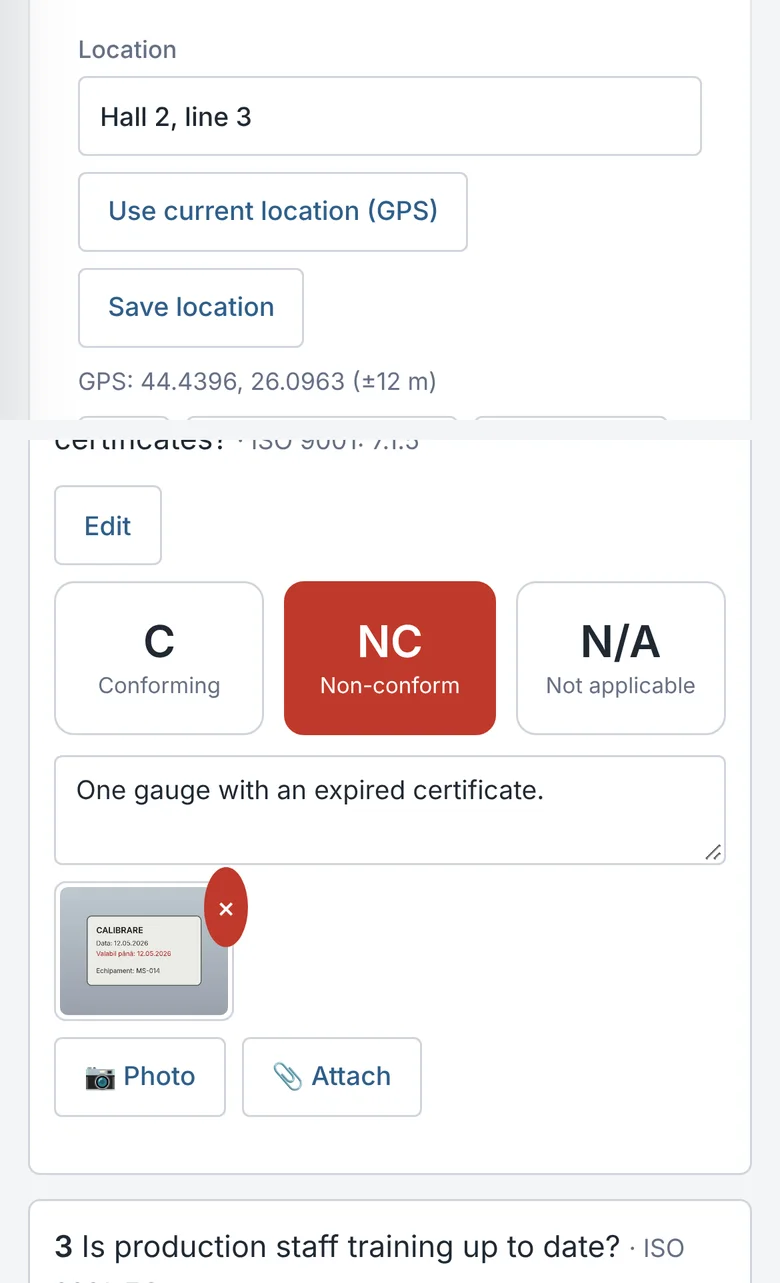
  • A photo for every checklist point, taken with the phone camera or attached from the gallery
  • GPS location for each point and for the whole audit
  • Signatures, and the report sent by e-mail after completion
E-QMS
Audit checklist – E-QMS
Completed audit checklist, with clauses, results and notes.
Audit checklist on a phone, with a photo and GPS location
On the phone: the audit location with GPS and a checklist point with a photo attached. Fictitious location and data.

Nonconformity management

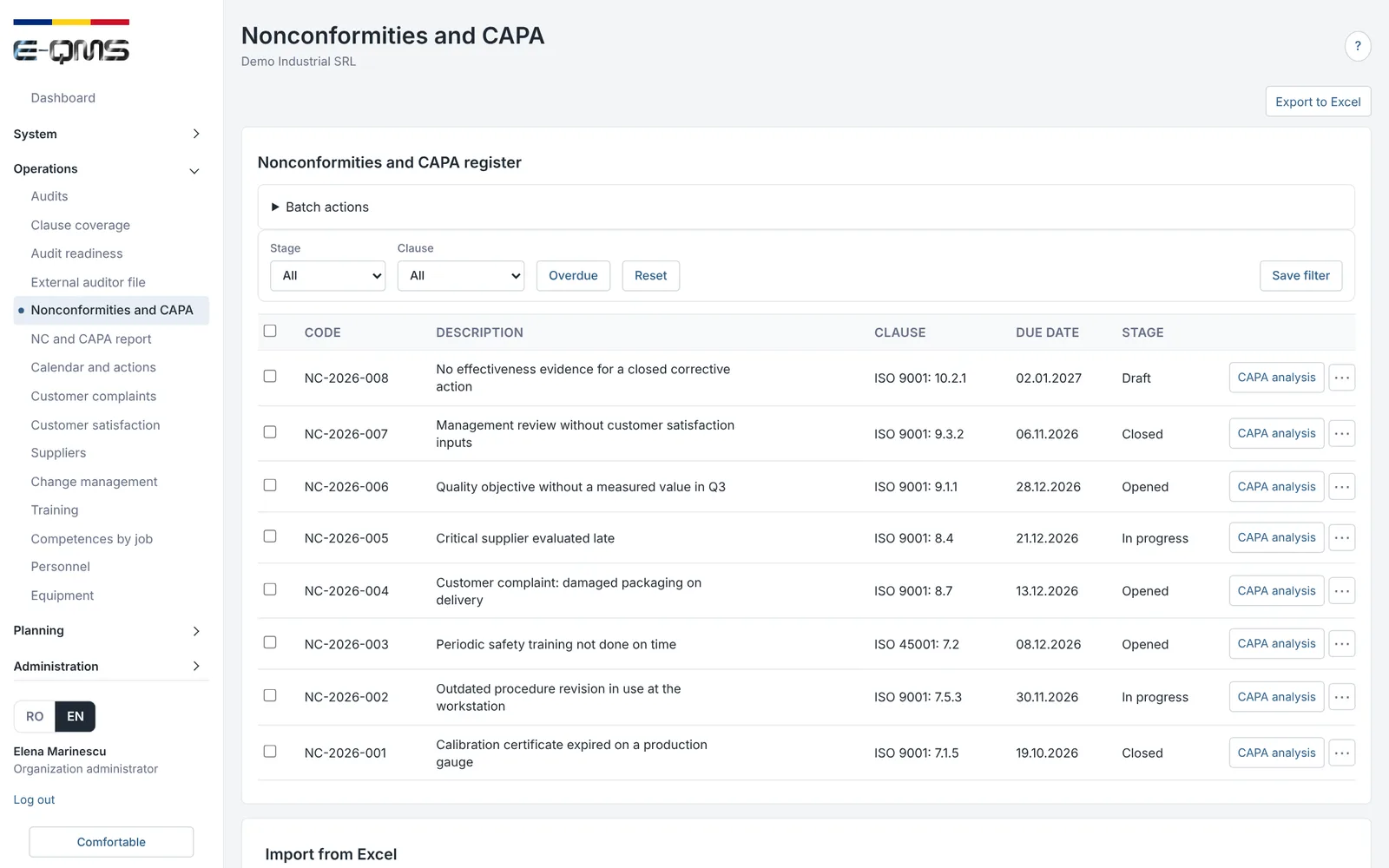
Nonconformities are recorded in a single register, whether they come from audits, complaints, suppliers, equipment or risks, with clause, classification and evidence.

  • Nonconformities opened directly from audit points, with evidence attached
  • Classification, cause analysis, correction and owner
  • Excel export and a nonconformity and CAPA report
E-QMS
Nonconformity management – E-QMS
Register of nonconformities and corrective actions, with stage and due date.

Corrective action workflow

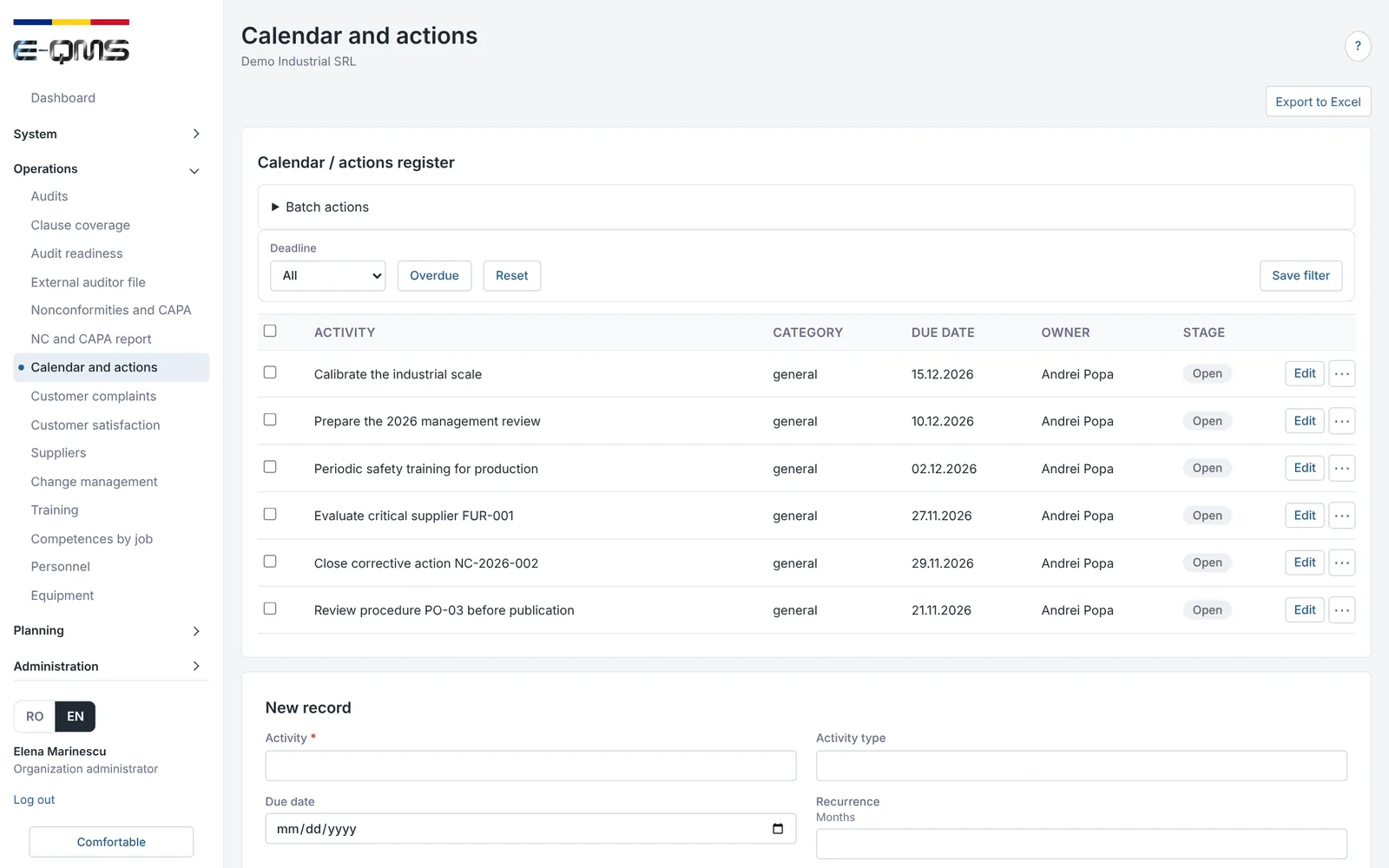
Every nonconformity leads to a corrective action with an owner and a due date, followed up to closure in the organization's action calendar.

  • Action calendar with owner, due date and stage
  • E-mail alerts when a deadline approaches or has passed
  • Overdue items appear on the dashboard
E-QMS
Corrective action workflow – E-QMS
Calendar and actions: owner, due date and stage for every activity.

Effectiveness verification

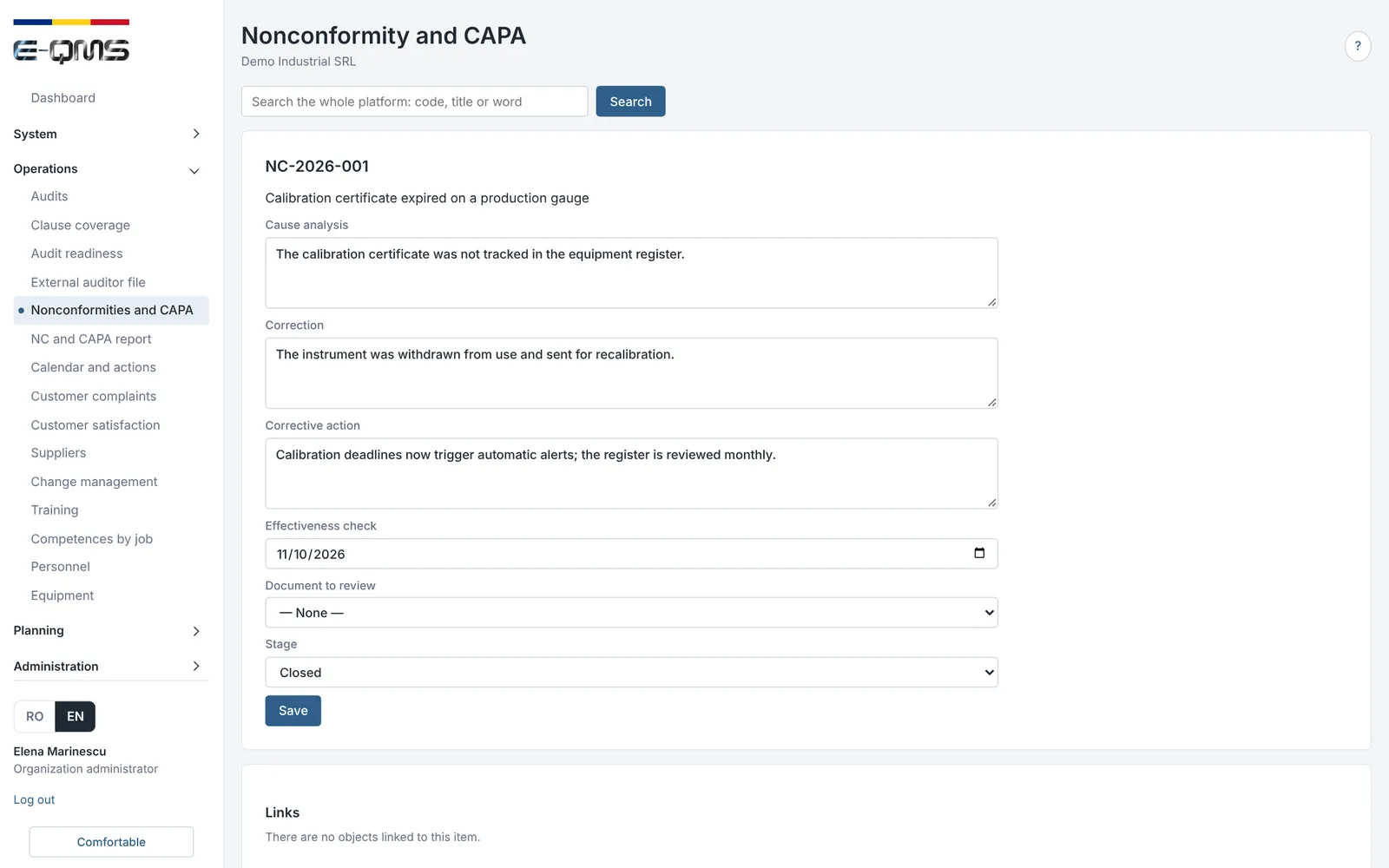
An action is not closed just because it was carried out. The platform asks for the effectiveness check date and creates the verification task, to prove that the problem has not come back.

  • Effectiveness check date recorded on each nonconformity
  • Verification task created automatically, with owner and due date
  • Closure of the nonconformity, with the history of the steps taken
E-QMS
Effectiveness verification – E-QMS
Nonconformity with cause analysis, correction, corrective action and effectiveness check.

Objectives and indicators

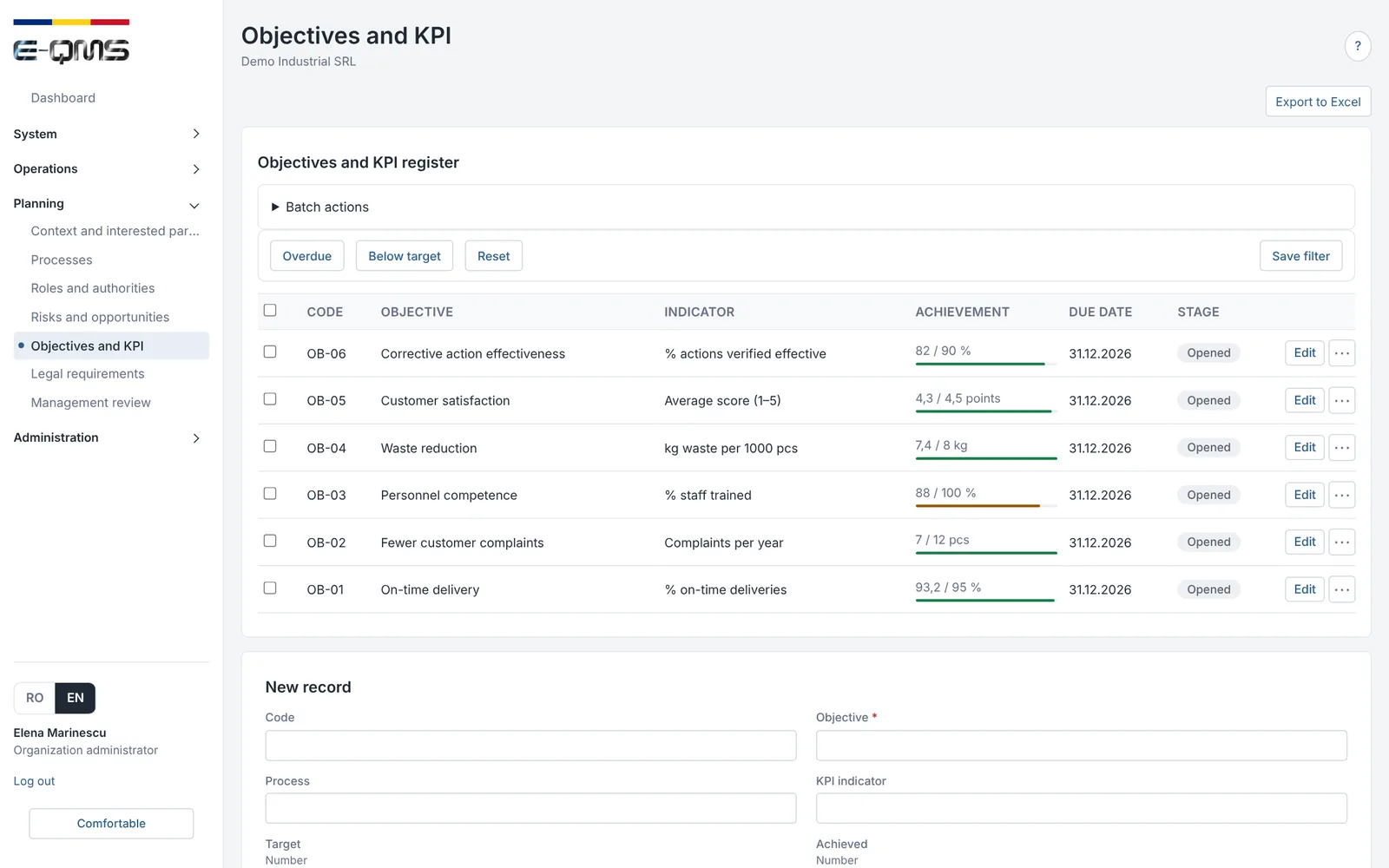
Quality objectives (or objectives under any other standard) have an indicator, a target, a due date and an achieved value, and progress is visible at a glance.

  • Indicator, target and achieved value for each objective
  • Progress bar and stage for each objective
  • Objectives feed the audit checklist and the management review
E-QMS
Objectives and indicators – E-QMS
Objectives and KPIs: indicator, target, achieved value and due date.

Risk management

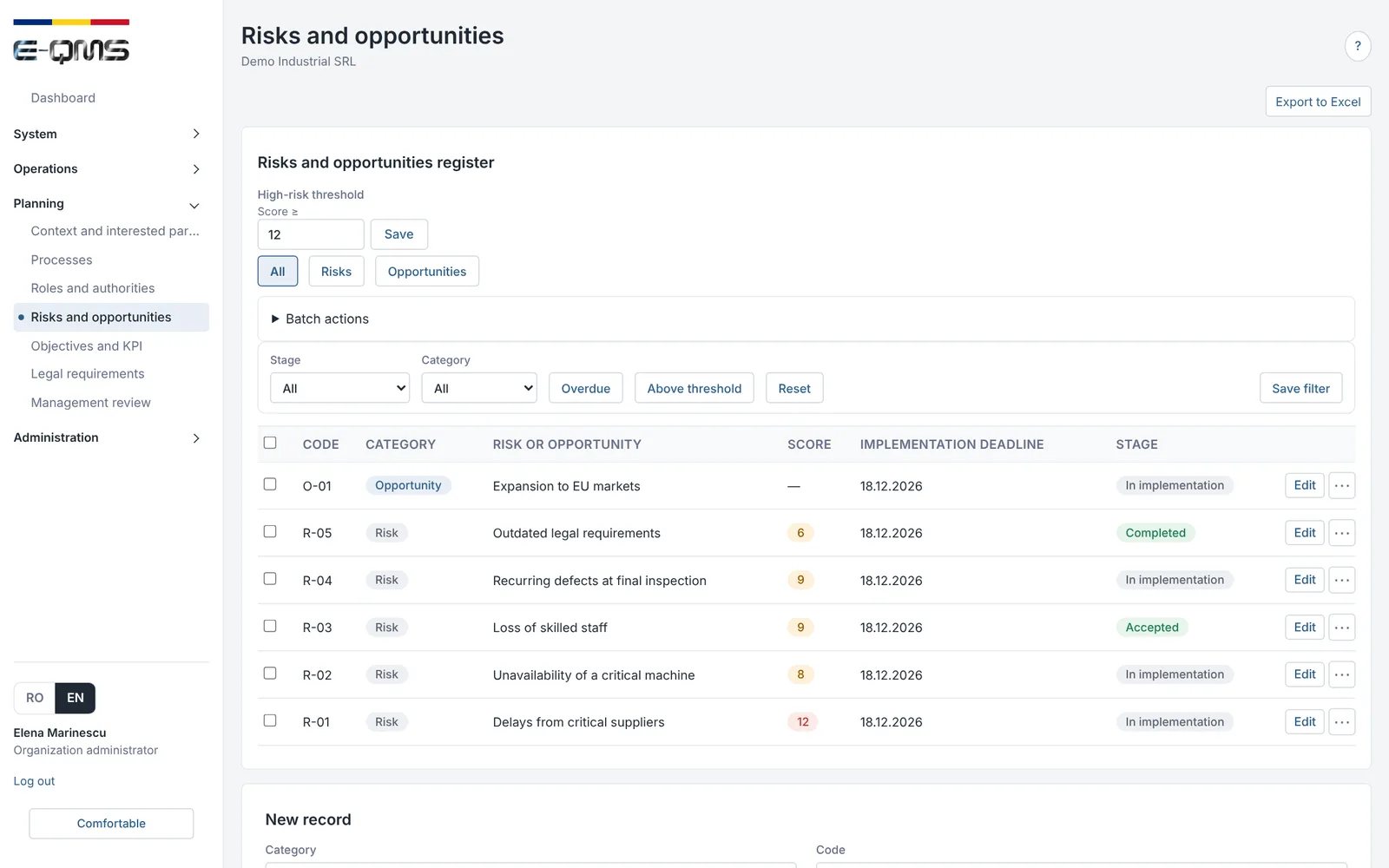
Risks and opportunities are recorded with a score, an implementation date and a stage. The platform highlights what exceeds the threshold set by the organization.

  • Register of risks and opportunities, with calculated score
  • Risk threshold set by the organization and a filter for risks above it
  • High risks appear on the dashboard and in the management review
E-QMS
Risk management – E-QMS
Register of risks and opportunities, with score, due date and stage.

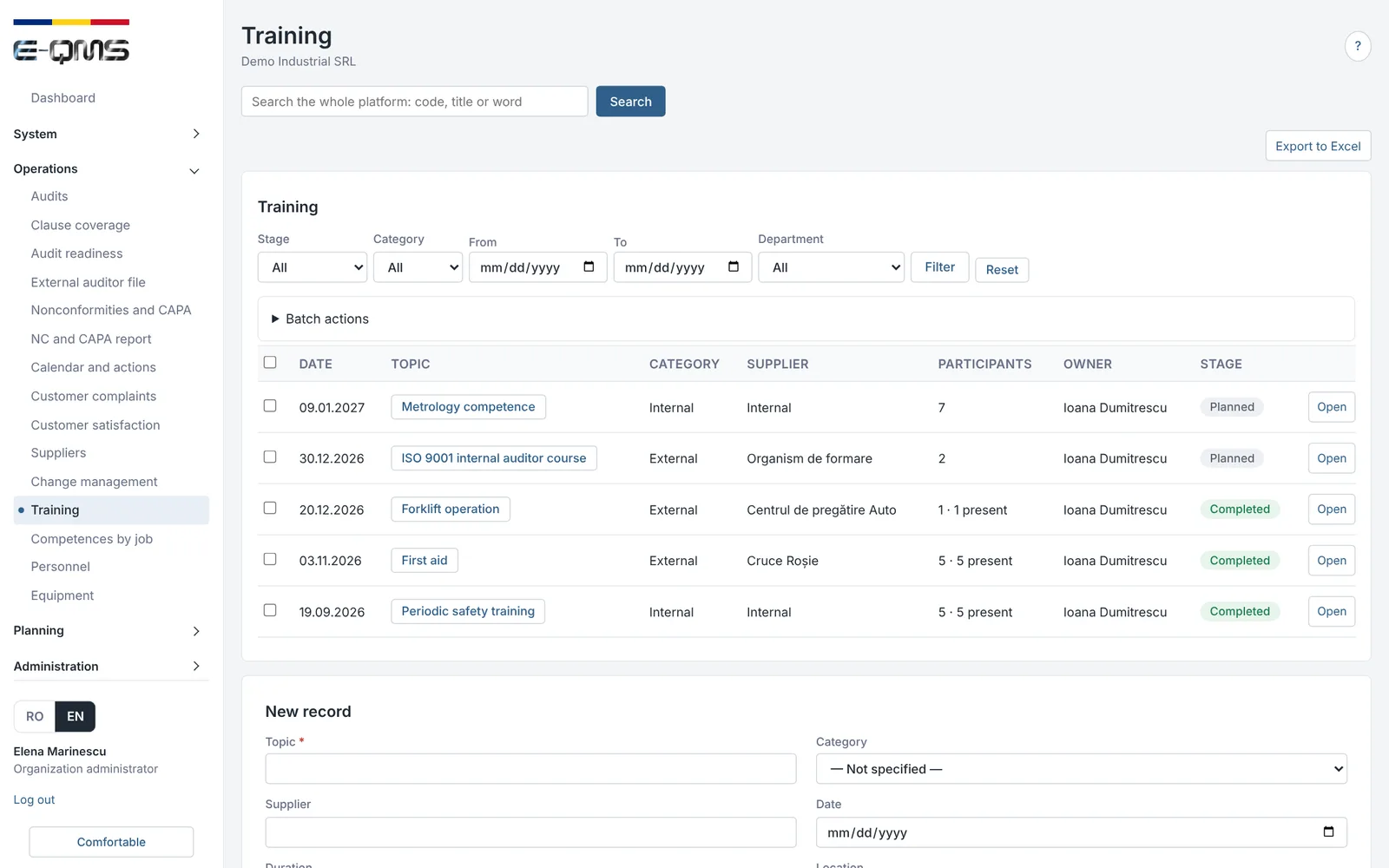
Training and competence

Training is planned and recorded with topic, provider, participants and owner, and competences are tracked by job, so evidence exists at audit time.

  • Planning and records of internal and external training
  • Competences by job and personnel records
  • Training feeds the audit checklist and the management review
E-QMS
Training and competence – E-QMS
Training: topic, category, provider, participants and stage.

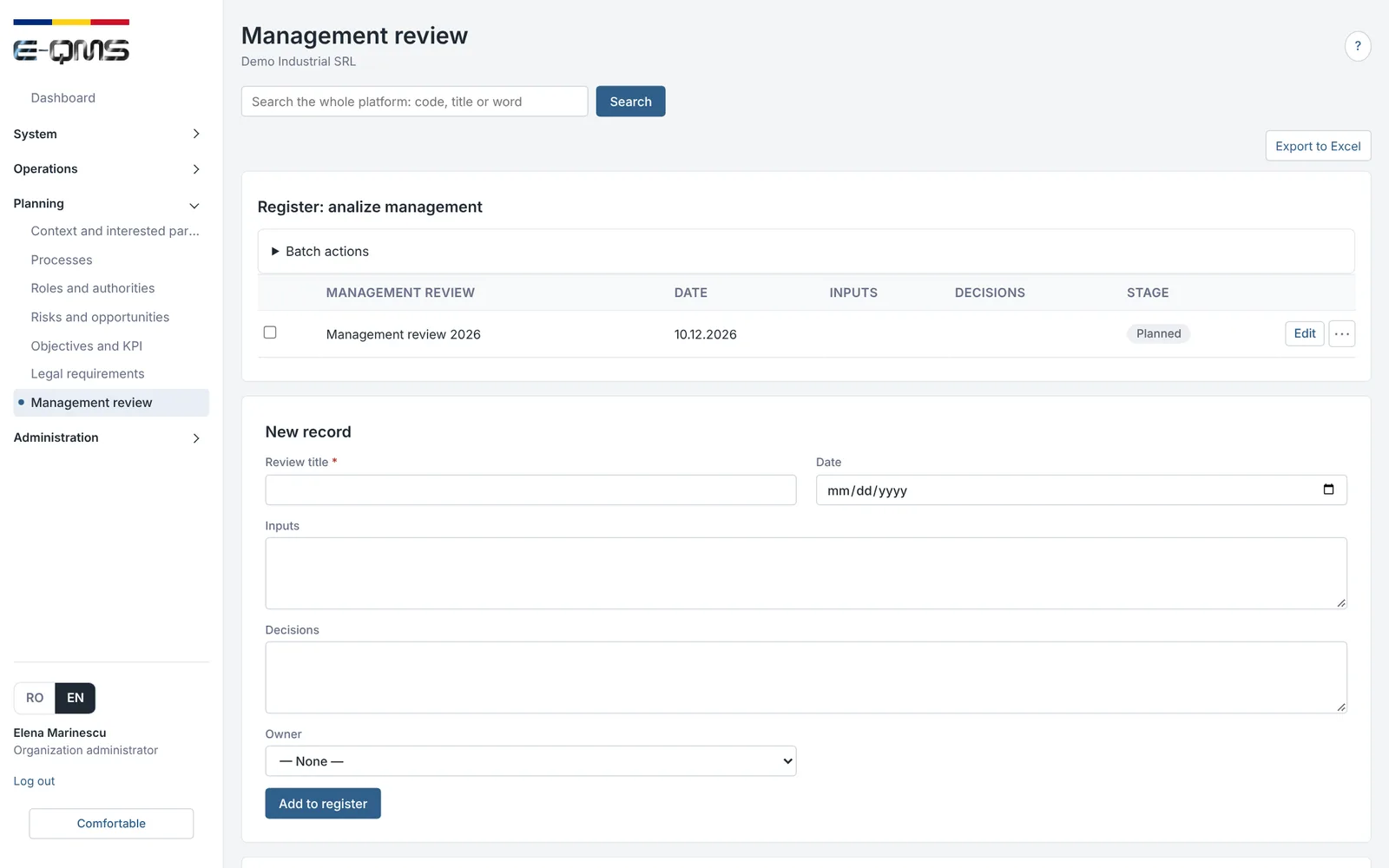
Management review

The data needed for the review (nonconformities, objectives, risks, audits, training) is already in the platform. The report is generated from it, and management decisions become actions with an owner and a due date.

  • Management review report generated from platform data
  • Decisions recorded with owner and due date
  • Resulting actions followed up to closure
E-QMS
Management review – E-QMS
Management review: register of reviews, with dates and decisions.
  1. Platform dataNCs, objectives, risks, audits
  2. Generated reportfor management review
  3. Decisionstaken by management
  4. Actionsfollowed up to closure
Standards

One system for all the standards the organization uses

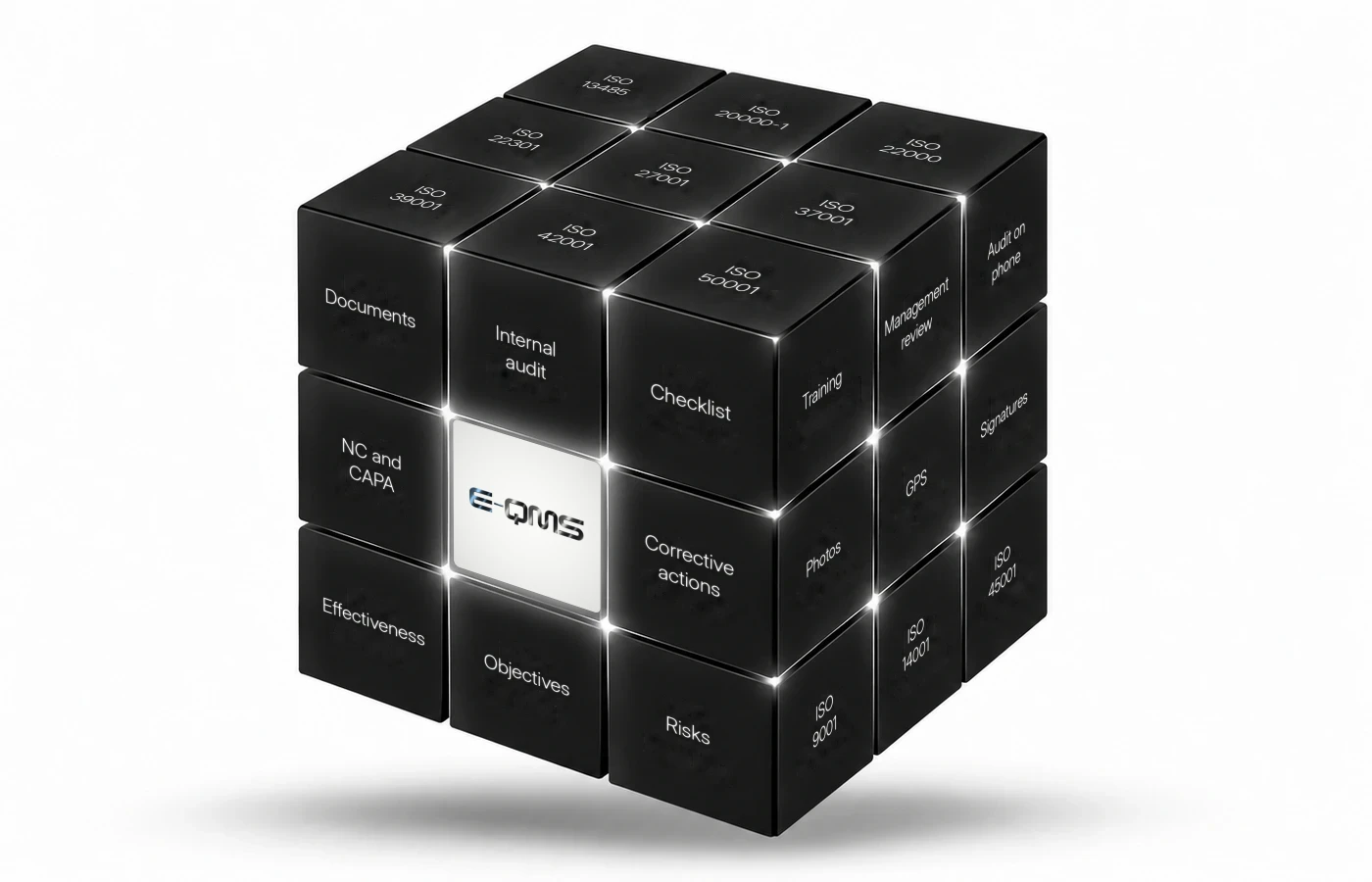
E-QMS covers 12 ISO standards. For organizations with integrated systems, common requirements are managed once, and the audit checklist does not repeat the same clauses for every standard.

Implementation

How it is implemented together with consulting

The platform is not a product you receive and put aside. It is put into operation together with the management system, by the same team that does the consulting and the internal audit.

Situation analysis

We establish the standards, processes, locations and roles in the organization.

Setup and import

The organization is set up in the platform and existing documents are imported.

User training

Each role (author, reviewer, approver, reader, auditor) is trained on its own part of the work.

Internal audit and management review

The first audit cycle and the first management review are carried out directly in the platform, with the consultant's support.

Roles

Each user sees what is theirs

The platform works with roles: organization administrator, process owner, author, reviewer, approver, reader, internal auditor and external auditor. An auditor only has access to the audits assigned to them.

Frequently asked questions

E-QMS FAQ

What is E-QMS?

E-QMS is a web platform for managing the ISO management system: document workflow, internal audits, nonconformities and corrective actions, objectives, risks and management review.

Which standards can it be used for?

The platform covers ISO 9001, 13485, 14001, 20000-1, 22000, 22301, 27001, 37001, 39001, 42001, 45001 and 50001.

Can the audit be completed on a phone?

Yes. The auditor completes the checklist on a phone, tablet or computer, with a photo for each point, GPS location and signatures, and the results stay in the same audit, together with the plan, report and nonconformities.

What does the platform do automatically?

The platform sends deadline alerts by e-mail and a monthly report, notifies readers of approved documents, generates the audit checklist from the organization's data, generates the audit report and the management review report, opens nonconformities from audit points with the evidence attached, and recalculates the dashboard with a daily snapshot.

How is the audit checklist generated?

The platform proposes questions based on the organization's data: published documents, nonconformities, objectives, risks, training, equipment and suppliers. Where there is no data, only the clause remains. The checklist can be edited before validation.

Does E-QMS issue ISO certificates?

No. Certification is carried out by an independent certification body. E-QMS helps the organization keep the system organized and the evidence up to date.

Is the interface available in English?

Yes, the platform interface is available in Romanian and English.

How do I find out the cost or see the platform?

Request a demo. We show you the platform on an example and agree together which standards, users and services are needed.

Request a demo

See E-QMS on an example

Tell us which standards you use, how many users would work in the platform and which workflow interests you most. We show you the platform on an example and agree on the next steps together.

  • Demo on fictitious data, adapted to your standards.
  • Implementation together with consulting and internal audit.
  • Pick the workflow you are interested in and we go through it on the example.

Direct contact

Phone: +40 722 773 446

Email: contact@qms.ro

Address: Str. Petru Rareș Nr. 12, Bucharest